How I Use Codex
I work with Codex through a set of named skills. Each one is a Markdown file of instructions, and together they take an idea through to finished work. When something in production fails in a way I didn't expect, I use Codex to test it, and what we find becomes a new rule.
A real example
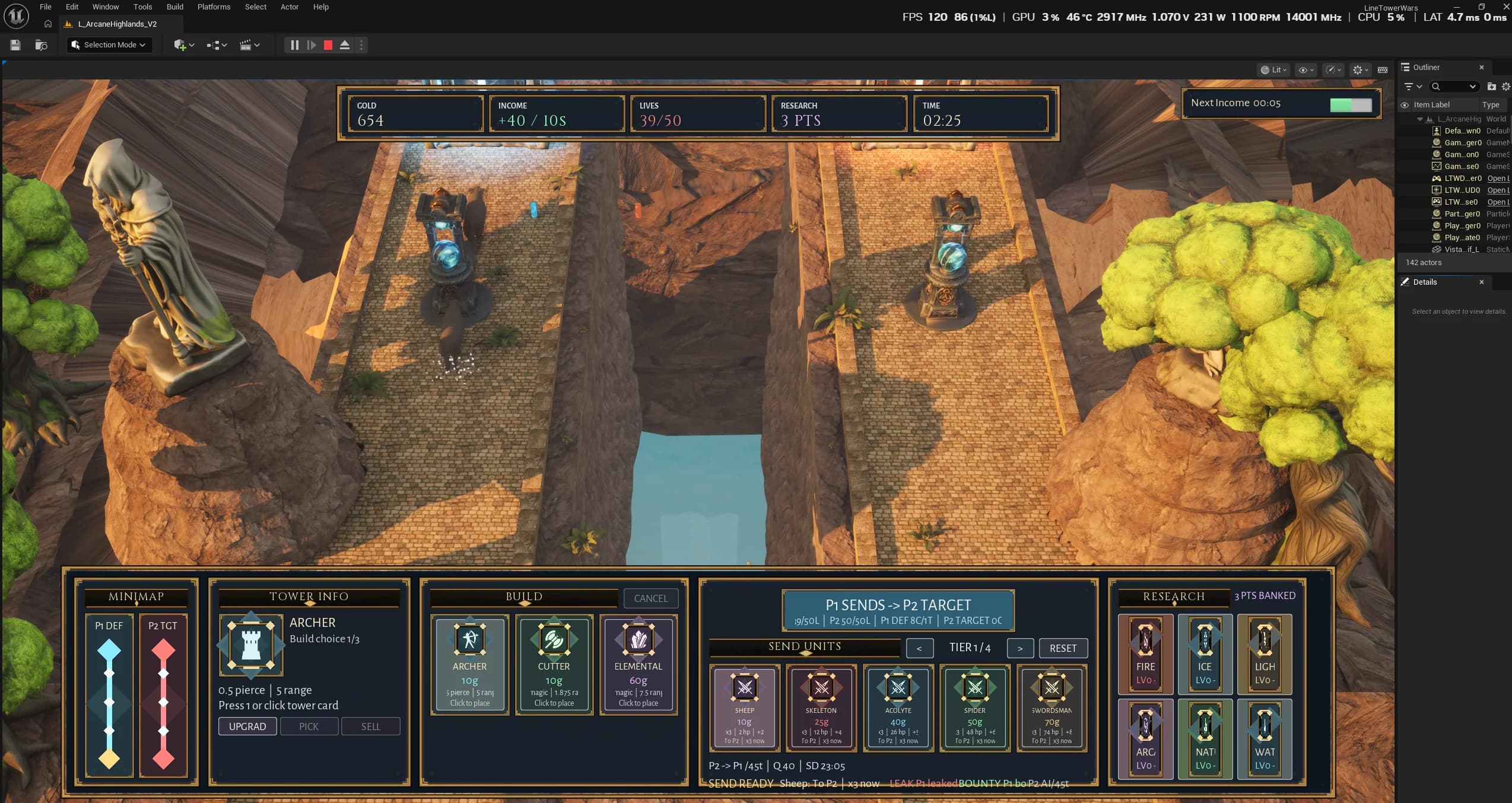
Question: How do I rebuild a tower-defense prototype that runs in a browser as a playable game in Unreal Engine?
Skills: Think Deeper, Make It Real, and Visual Art Direction.
Result: A playable Unreal Engine 5.8 build with a two-lane battlefield and a readable RTS interface, checked with captures taken from the engine itself.
How I take an idea to finished work
I don't use every skill every time. When I do take an idea all the way through, this is the usual order.
Hatch
Pitch one to three ideas that have just become possible and that one person could build, and drop any that are recycled or already crowded.
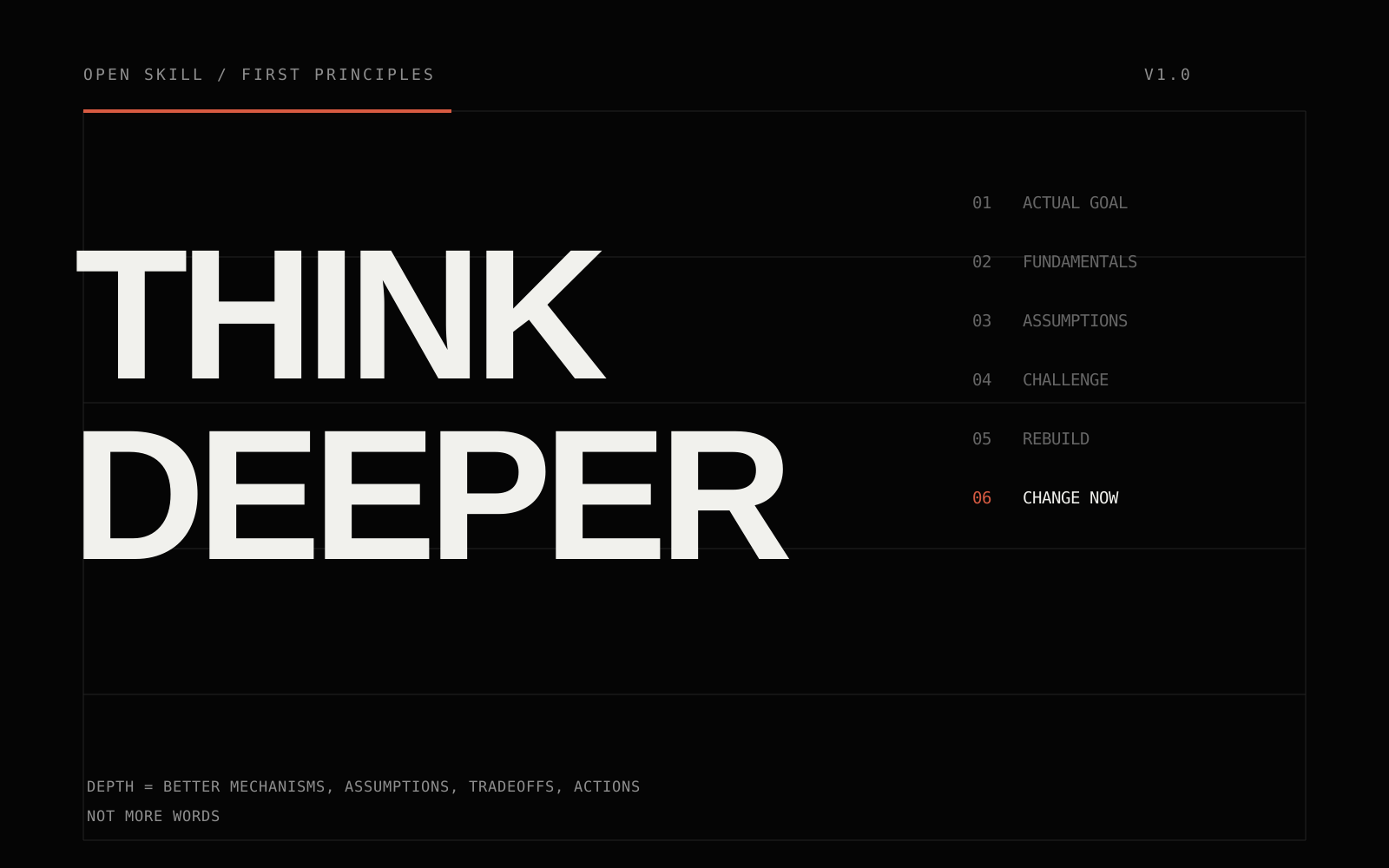
Think Deeper
Take a plausible first answer apart and rebuild it from first principles.
Make It Weirder
Make an idea less predictable without letting it turn random or gimmicky.
Grill Me
Give an honest verdict, point out the weaknesses that matter most, and suggest concrete improvements.
Make It Real
Turn a vague idea into something usable, such as a spec, a prototype plan, a test, or a first draft.
Remove AI Slop
Remove the choices AI makes by default in writing, design, and code, while keeping the facts, the voice, and anything complex or odd that is there on purpose.
Production skills
I use these once the direction is clear and Codex is doing the making.
Visual Art Direction
Set the visual direction
Turn a vague visual brief into one specific direction: a central idea, the composition, type, and color that go with it, and a plan for producing it.
Imagegen Production Director
Direct image production
Run a batch of generated images: give each reference image a specific job, approve one version of any recurring character or product before making variations, change one thing at a time, and keep a record of what was accepted and rejected.
Recursive Grain Fixer
Keep repeated edits clean
Stop grain and drift from building up over repeated image edits: keep the clean original, edit from it once where possible, and go back to it or start fresh instead of trying to fix an image that has already degraded.
Design Polish
Build the interface
Build or refine an interface with one clear focus per screen and a small type system, and without the usual AI look of gradient blobs, violet branding, and emoji icons.
Frontend Acceptance Harness
Test it in the browser
Check a frontend change by using it in the running app: click through it at phone and desktop sizes, try the keyboard, and look for console errors, failed requests, and anything lost on refresh.
Recursive grain in GPT Image 2
I kept seeing the same problem when I edited one image over and over in OpenAI's GPT Image 2. A clean image would come through one edit fine, then slowly pick up grain, cloudy mottling, and waxy surfaces, and eventually a raised-looking pattern. I noticed it most after long production sessions, so it would have been easy to write off as my own taste, or as chance. I took it to Codex, and we set up a small series of tests.
Keep the examples
We saved the before and after images, and wrote down what we could see separately from any theory about the cause.
Fix the test in advance
Every edit used the exact same no-op instruction (one that asks for no change) and worked only from the image just before it. No retries, and no picking a better result.
Measure the smooth areas
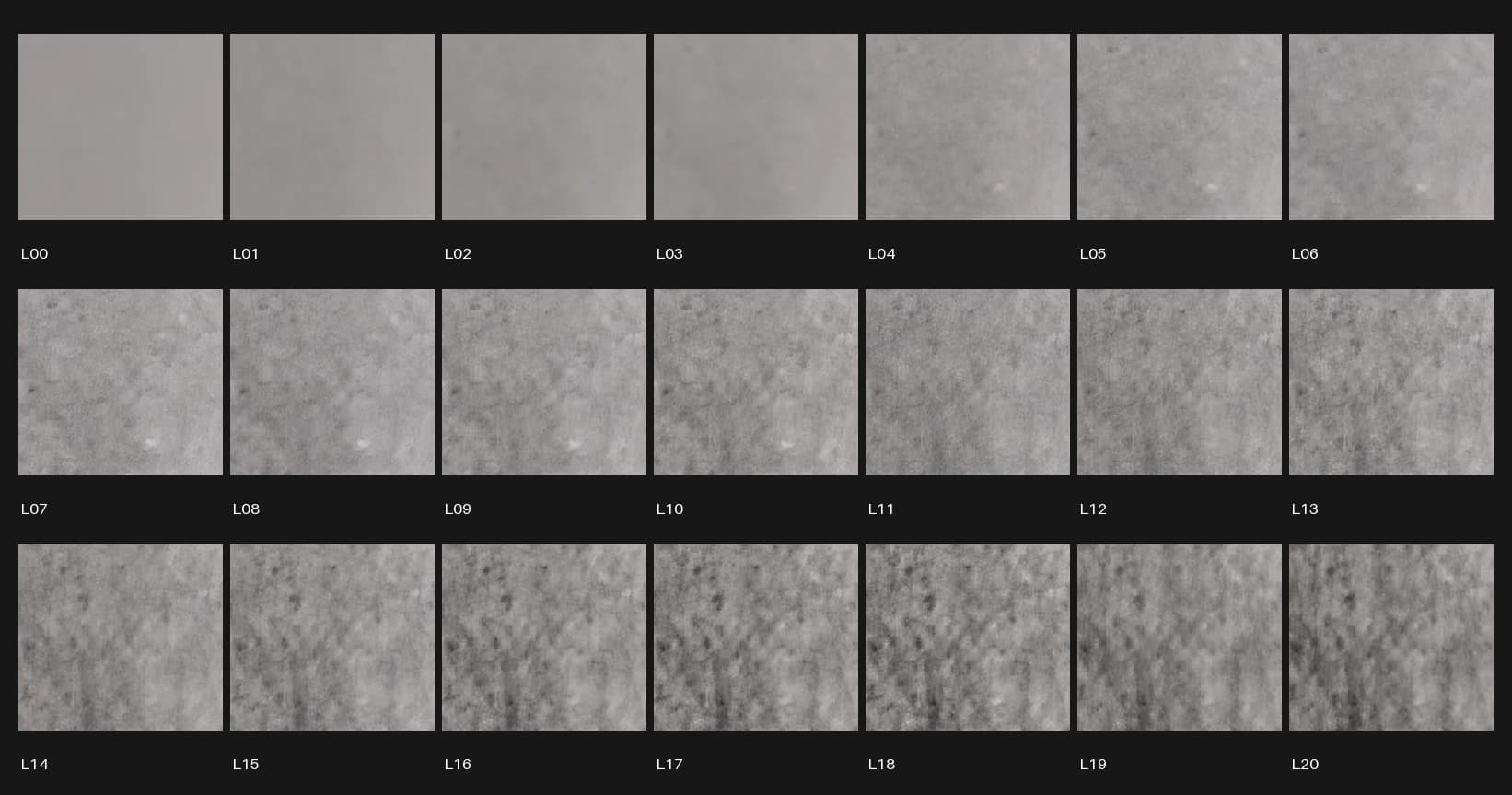
Before running any edits, we picked fixed crops of smooth background. In those crops we tracked residual texture, grayscale difference, and similarity to the original, and we also looked at the full images at native resolution.
Write it down as a rule
What we found became a rule for later image work: which image to edit from, and when to stop editing.
Test 1: other kinds of image, and prompt wording. Over 12 calls, we compared a photographic portrait with a flat graphic, and compared first edits with and without a prompt asking for clean surfaces. After three no-op edits, the portrait's background residual was 1.96x where it started. The graphic changed mostly in its gradients, scale, color, and layout. Asking for no grain made no measurable difference, but that comparison was small: two images for each version of the prompt.
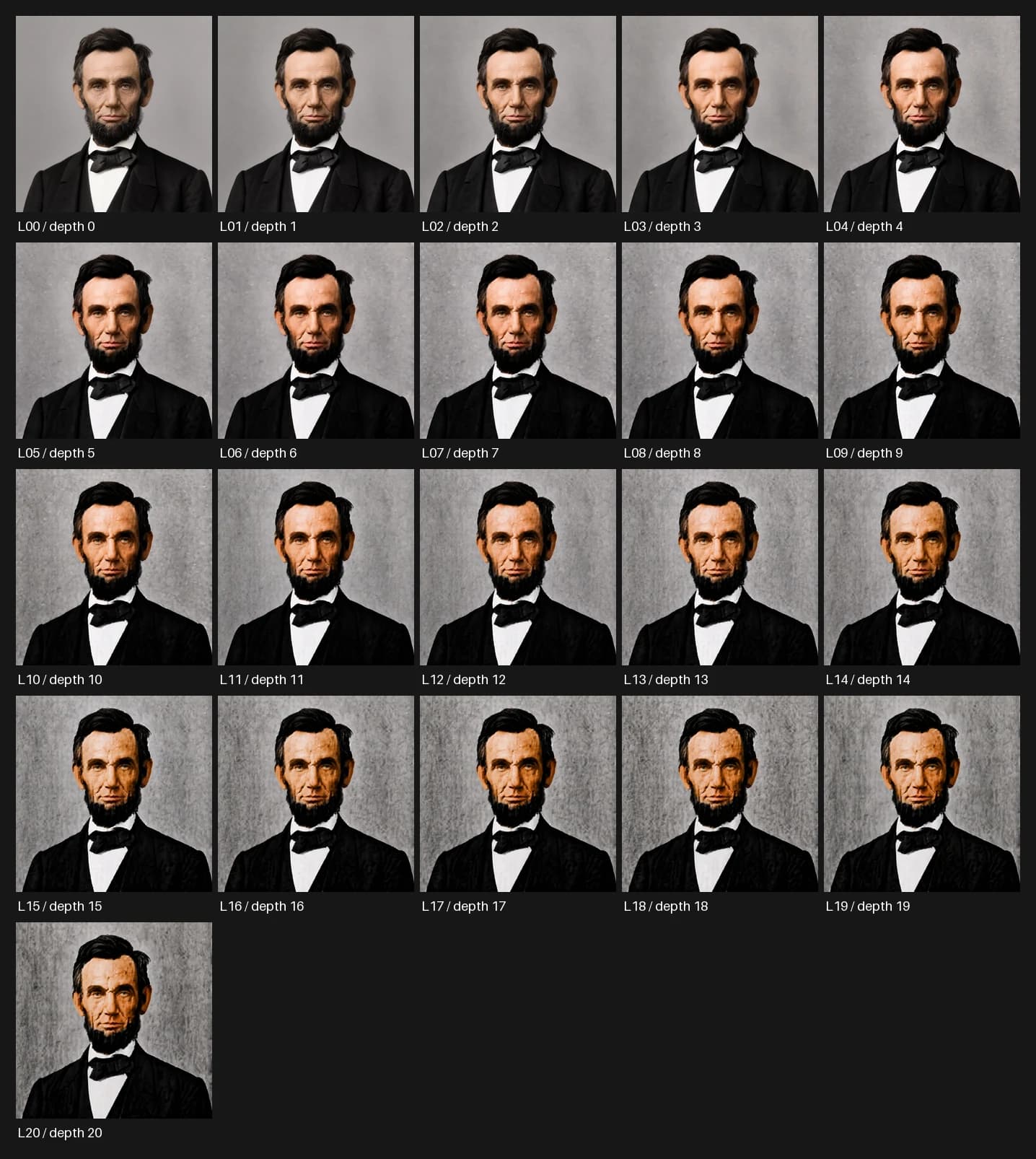
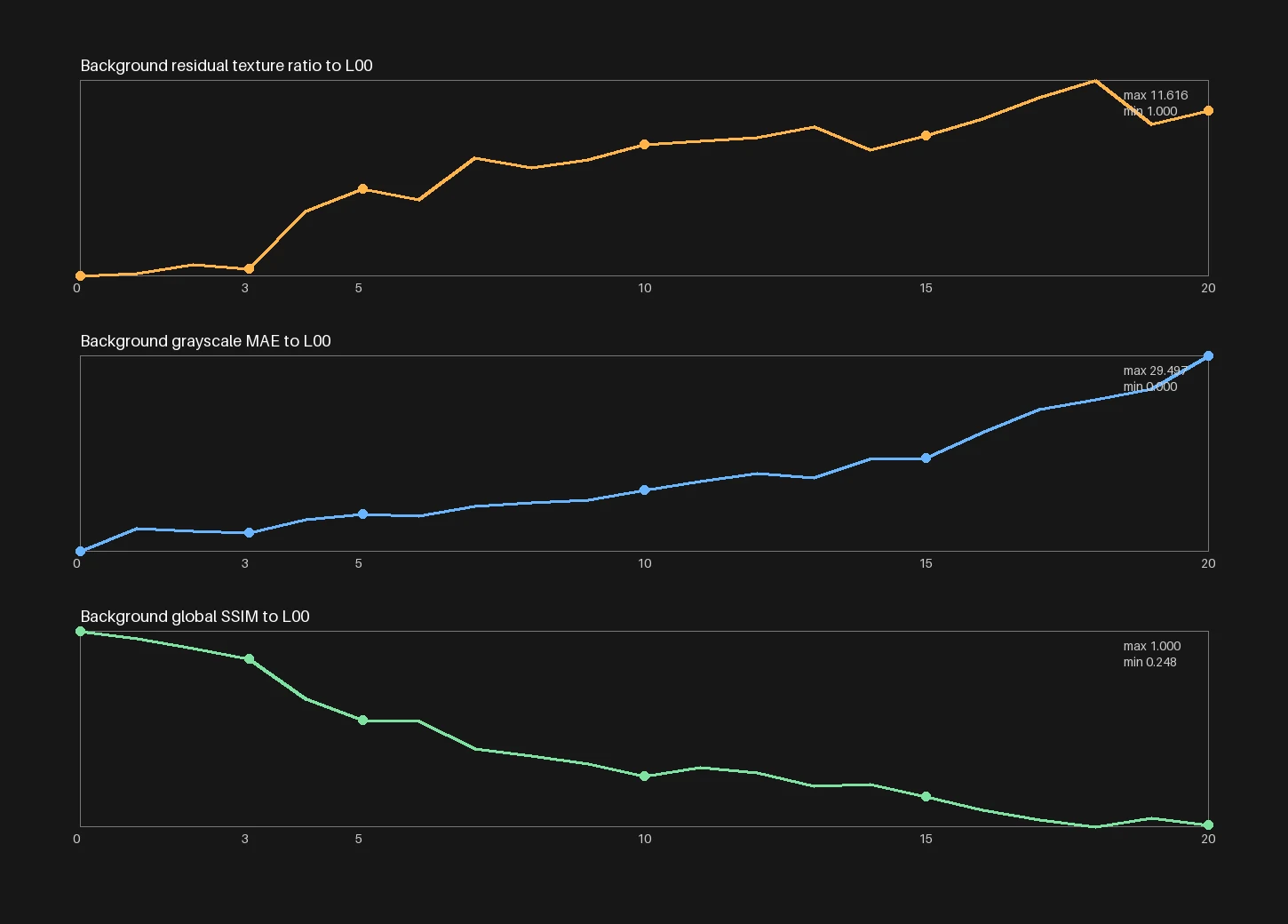
Test 2: an anonymous portrait, 20 edits. We put one new portrait through twenty identical no-op edits. Residual texture in the background rose to 9.96x the starting level, background similarity fell from 1.000 to 0.173, and the number of edits correlated with residual texture at r = 0.982.
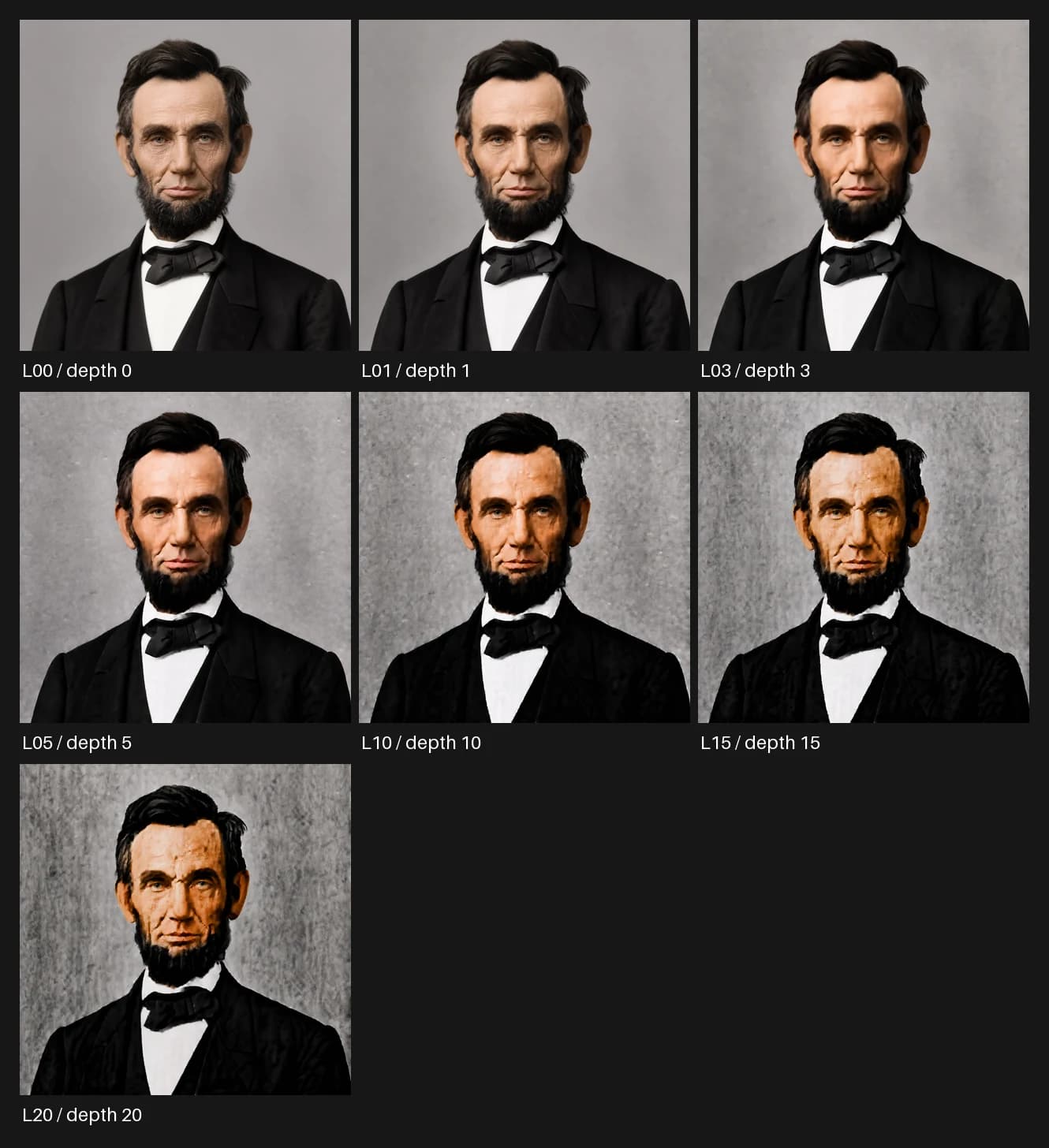
Test 3: a famous subject, 20 edits. We ran the same chain on Abraham Lincoln to test a well-known face. It produced 21 images in sequence, each 1254 by 1254, with no retries or alternates. A separate attempt to make a Batman starting image was blocked by output moderation, so there was no image, and we didn't retry it.
Controls and limits. Every generation and edit in these tests used GPT Image 2 (gpt-image-2), and each repeated edit worked only from the image just before it. We fixed the prompts and crop locations before each comparison. We couldn't see the exact backend version or the random seeds, so these results describe GPT Image 2 as I tested it, not every image model or backend.
| Edit depth | Background residual | Similarity to L00 |
|---|---|---|
| 0 | 1.00x | 1.000 |
| 1 | 1.13x | 0.973 |
| 4 | 4.55x | 0.739 |
| 5 | 5.73x | 0.659 |
| 10 | 8.14x | 0.442 |
| 18 | 11.62x | 0.248 |
| 20 | 9.99x | 0.255 |
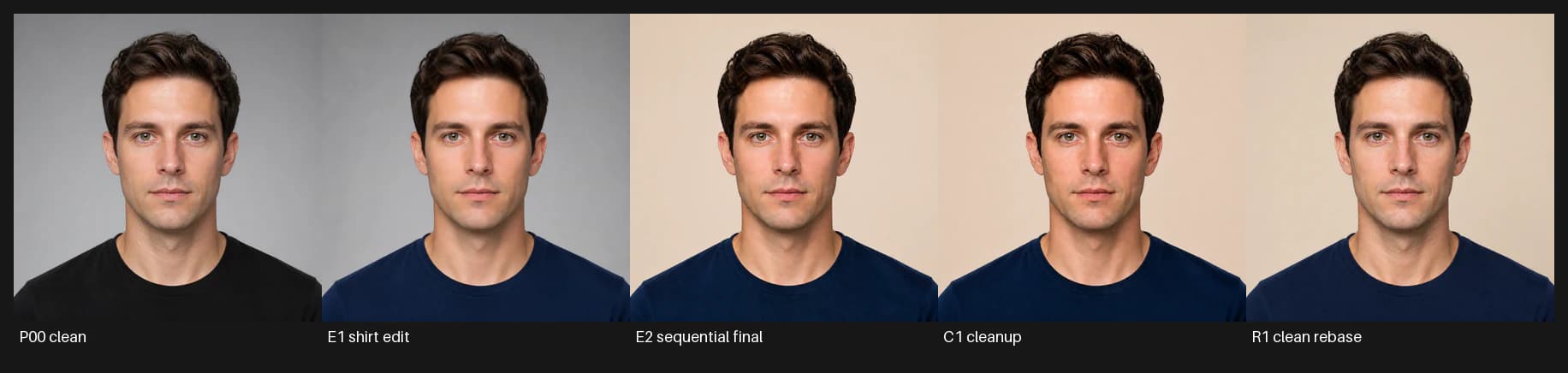
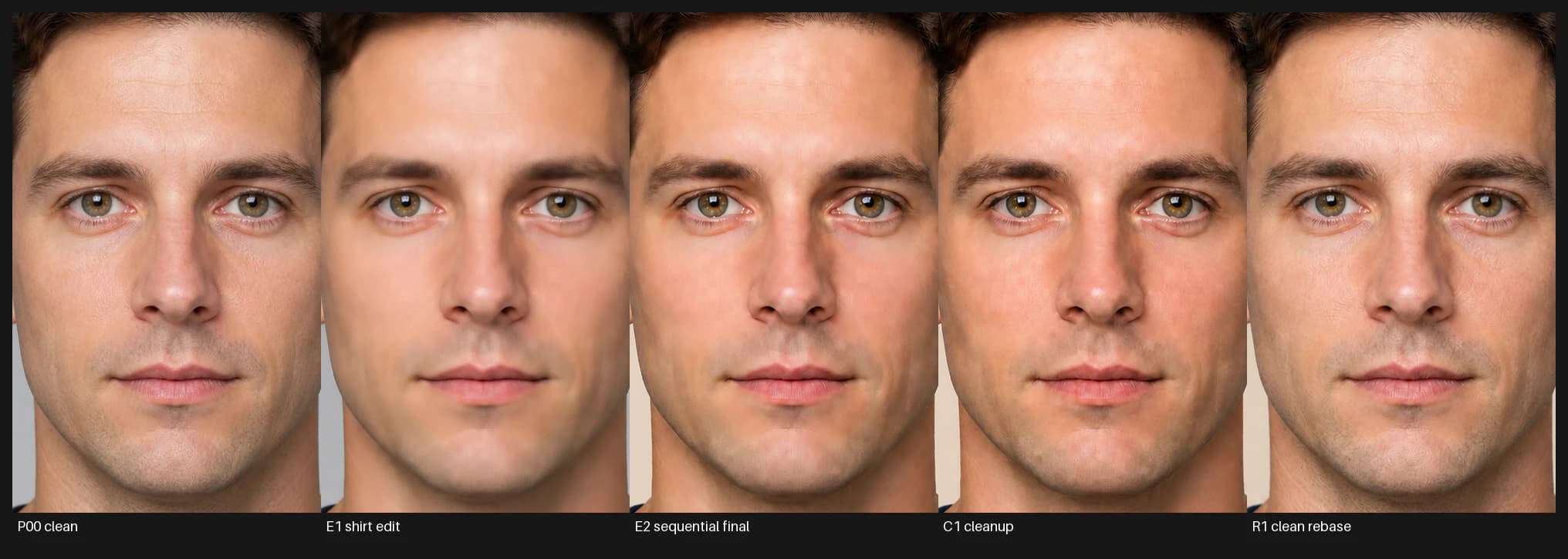
Test 4: going back to the original versus cleaning up. This test was closer to real work. A portrait needed two changes: turn a black shirt deep navy, then turn a gray background warm beige. We reached the same end result two ways. C1 tried to clean up the latest image in the sequence, three edits from the original. R1 (the rebase) went back to the untouched P00 portrait and made both changes in a single edit.
The rebase kept more of P00 on every measure. Face similarity to P00 was 0.9834 for R1 and 0.9670 for C1, and face error fell from 7.777 to 5.996. Hair similarity went from 0.8966 to 0.9245, and hair error fell from 22.774 to 17.601. R1's texture growth was also 5.1% lower on the face, 13.1% lower in the hair, and 14.0% lower on the shirt.
Going back to a clean original is clearly safer than cleaning up a damaged image, but it didn't fix the problem. R1 still had visible maze-like texture on the forehead, cheeks, neck, and hair, so it failed the grain check at native resolution. Even a single edit doesn't leave the rest of the image exactly as it was.
The rule I follow now
Asking for no grain in the prompt can help describe the clean result you want, but it doesn't solve the problem. What matters more is how many edits the image is from the clean original.
Always keep the clean original
Never let the most-edited file be the only copy left.
Make one edit by default
Only make a second edit on top of the first after checking it at native resolution: smooth backgrounds, skin, hair, fabric, edges, and whether the subject still looks like the same person.
Go back to the clean image
Combine later changes into one edit from the last approved clean image. Don't keep editing the damaged one.
Start over when the exact image doesn't matter
Generate a new image with no reference image, and describe everything you want in the prompt. You lose the exact image, but you also lose the damage that built up in it.
Stop at the first texture you can't explain
Mottling, a plaster look, patterned loops, waxy skin, flattened materials, or a subject that starts to look like someone else: any of these means stop editing that image. More edits won't fix them.
The full procedure is also a Codex skill. You can download the Recursive Grain Fixer SKILL.md, or read and copy it with the other skill files below.
The skill files
Each skill is a plain Markdown file. Open one to read the instructions, copy it, or download it.
HatchFind the idea
Pitch one to three ideas that have just become possible and that one person could build, and drop any that are recycled or already crowded.
---
name: hatch
description: Find strong ideas for what to build next. Use when the user asks for a new idea, asks what they should make or work on next, or wants untapped applications of current AI capabilities. Default to 1 to 3 tight pitches. Treat pitching, saving, specifying, building, and publishing as separate authority gates.
---

# Hatch

Find ideas that feel inevitable in hindsight: specific applications of current technology that should exist, but mostly do not yet.

## Workflow

1. Understand the user's abilities, taste, current work, constraints, and available tools.
2. Look for a specific observable behavior, frustration, or capability gap. Do not begin from a trend category.
3. When a technical capability is load-bearing, verify that it exists now.
4. Generate 1 to 3 ideas. For each, give:
   - a memorable working name;
   - the core insight;
   - why it is possible now;
   - what a focused weekend version looks like.
5. Compare against the user's existing work and obvious crowded territory. Remove recycled ideas and thin wrappers.
6. Commit to the strongest direction and explain why it clears the bar.

## The Bar

- The enabling technology is the mechanic, not a decorative feature.
- The idea comes from a concrete gap, not a vague market trend.
- One capable person can build a meaningful first version.
- The first version creates evidence instead of simulating a full company.
- The pitch is restrained, specific, and free of press-release language.

## Authority Gates

A request for ideas authorizes a pitch, not file creation or implementation. Save, specify, build, commit, deploy, pay for services, or publish only when the user asks for that stage.

## Guardrails

Do not produce a giant list. Do not pitch generic verticals with AI attached. Do not mistake novelty for usefulness. If no idea clears the bar, say what is missing instead of padding the answer.
Think DeeperQuestion the premise
Take a plausible first answer apart and rebuild it from first principles.
---
name: think-deeper
description: Perform an explicit first-principles depth pass on the current task, idea, product, codebase, creative direction, argument, plan, strategy, prompt, or decision. Use when the user directly asks to think deeper, reason from fundamentals, challenge the frame, or rebuild the answer at a more fundamental level. Do not auto-trigger merely because a task is complex; use a narrower skill when one exists for the actual request.
---

# Think Deeper

Re-examine the problem from fundamentals and return a sharper answer. Depth means better mechanisms, assumptions, tradeoffs, and next actions, not more words.

## Workflow

1. **Name the actual goal:** distinguish the desired outcome from the current solution shape.
2. **Reduce to fundamentals:** identify the forces, constraints, incentives, data, actors, and mechanisms that must be true.
3. **Expose load-bearing assumptions:** separate likely true, uncertain, probably false, and testable.
4. **Challenge the frame:** test problem, category, scale, audience, medium, timeline, and false constraints.
5. **Rebuild the formulation:** produce the simpler, more precise thesis, architecture, concept, plan, or decision frame.
6. **State what changes now:** cut, test, build, research, rewrite, or decide.

## First-Principles Prompts

Use only what clarifies the task:

- What outcome must exist at the end?
- What must be true for it to happen?
- Which constraints are real and which are inherited assumptions?
- What is the bottleneck: concept, execution, distribution, coordination, evidence, or taste?
- What is the simplest system that satisfies the goal?
- What complexity buys leverage and what merely creates work?
- What would change with half the resources or twice the quality bar?
- What next action would create real evidence?

## Output

Prefer:

- Deeper read
- First principles
- Hidden assumptions
- Frame correction
- Stronger formulation
- What changes now

For smaller asks, compress this to deeper read, strongest assumption, stronger version, and next move.

## Domain Calibration

- **Technical:** actual job, data and control flow, failure modes, complexity budget, testable slice.
- **Product:** first user, urgent need, substitute, wedge, distribution, retention, smallest proof.
- **Creative:** emotional center, point of view, world logic, audience reason to care, decorative versus consequential detail.
- **Argument:** thesis, definitions, mechanism, weakest link, strongest counterargument, conclusion that really follows.
- **Decision:** value being optimized, reversibility, unavoidable tradeoff, missing evidence, low-regret experiment.

## Guardrails

Do not perform profundity, add frameworks that do not change the answer, or turn a simple problem into a meditation. If the original approach is already right, say so and sharpen it. If the deeper answer is shorter, write the shorter answer.
Make It WeirderGet away from the obvious
Make an idea less predictable without letting it turn random or gimmicky.
---
name: make-it-weirder
description: Make an idea, prompt, brand, product, game, world, story, design direction, campaign, or creative concept more original, surprising, distinctive, less generic, or less safe while preserving coherence and usefulness. Use when the user asks to make something weirder, stranger, more memorable, less obvious, or less like generic AI output.
---

# Make It Weirder

Move the work away from the obvious middle without losing the thing that makes it work.

Weirdness is useful when it increases specificity, tension, memorability, or emotional charge. It is not useful when it becomes noise.

## Workflow

1. Identify the generic center of the current idea.
2. Name what must stay intact: audience, use case, tone, mechanic, promise, or emotional core.
3. Choose 3 to 6 pressure vectors:
   - unusual constraint;
   - sharper contradiction;
   - ritual, taboo, or social rule;
   - strange material detail;
   - changed scale or time horizon;
   - unexpected medium or interface;
   - more specific character or setting;
   - inversion of the default premise;
   - collision between worlds that normally do not touch.
4. Produce versions at different intensity levels.
5. Flag what is too far, what is promising, and what is worth developing.
6. End with a polished version that is distinctive but still usable.

## Output

- Generic center
- Keep intact
- Weirdness directions
- Best version
- Why this is better

## Guardrails

Prefer specific over random, contradiction over quirk, and a strange rule with consequences over decorative detail. Do not make the work edgy for its own sake. If it is already weird enough, make the weirdness more legible or consequential instead.
Grill MePressure-test it
Give an honest verdict, point out the weaknesses that matter most, and suggest concrete improvements.
---
name: grill-me
description: Give an honest overall verdict on an idea, project, plan, pitch, product, creative direction, technical approach, essay, strategy, or decision, then identify the strongest parts, decisive weaknesses, and concrete improvements. Use when the user asks to be grilled, pressure-tested, challenged, or given direct non-sycophantic criticism.
---

# Grill Me

Act as a constructive adversary who wants the work to win. Accuracy matters more than harshness.

## Calibrate The Verdict

Choose the closest state:

- **Strong:** worth pursuing; sharpen execution or positioning.
- **Promising but messy:** something real exists, but the concept, audience, structure, or path is confused.
- **Weak:** the premise is derivative, impractical, undifferentiated, or not worth prioritizing.
- **Too early to judge:** decisive information is missing; identify the smallest revealing test.

Do not make a negative verdict perform honesty. If the work is good, say so.

## Pressure-Test

Use only the lenses that can change the recommendation:

- audience and urgent demand;
- differentiation and defensibility;
- emotional or conceptual center;
- execution difficulty and scope;
- distribution and repeat use;
- technical leverage versus complexity theater;
- taste and generic defaults;
- opportunity cost;
- load-bearing assumptions and failure modes.

Ground every criticism in the artifact, evidence, market, workflow, or mechanism. Replace vague feedback with the exact change.

## Output

1. **Honest verdict:** one to three sentences.
2. **What is actually good:** only real strengths and why they matter.
3. **What is weak, confused, or risky:** the few issues most likely to hurt the work.
4. **The uncomfortable question:** one question the current framing may be avoiding.
5. **How to strengthen it:** what to cut, narrow, test, rewrite, build, or prove.
6. **Final call:** pursue, narrow, prototype, pause, kill, merge, or gather evidence.

## Guardrails

Critique the work, not the user's worth or intelligence. Do not invent flaws, use cruelty as theater, pad with a compliment sandwich, or preserve a weak idea out of politeness. A harsher request permits more direct language, not less accurate judgment.
Make It RealMake it concrete
Turn a vague idea into something usable, such as a spec, a prototype plan, a test, or a first draft.
---
name: make-it-real
description: Turn a vague idea, brainstorm, product concept, strategy, creative direction, feature, workflow, prompt, essay, or plan into something concrete. Use when the work needs to become a spec, user flow, task list, prototype plan, test plan, example, implementation sequence, launch sequence, or first usable version.
---

# Make It Real

Convert a fuzzy idea into something that can be built, tested, assigned, written, or tried. Replace atmospheric language with decisions, artifacts, and next actions.

## Workflow

1. Restate the desired outcome in concrete terms.
2. Choose the artifact the situation needs:
   - product spec;
   - user flow;
   - implementation plan;
   - prototype path;
   - test plan;
   - prompt;
   - outline;
   - ticket;
   - launch sequence;
   - first draft.
3. Define the actors, inputs, outputs, states, constraints, and success criteria.
4. Build the first useful version of the artifact.
5. Identify the smallest next action that would create real evidence.
6. List only the open questions that block execution or meaningfully change direction.

## Concrete Defaults

Prefer named users or actors, visible states, actual examples, acceptance criteria, ordered tasks, testable claims, useful dates or sequence, and explicit non-goals.

## Guardrails

Do not turn uncertainty into process theater. Do not produce a giant plan when a prototype, ticket, or example would be more useful. If the idea is too vague to execute, show the missing load-bearing decisions plainly.
Remove AI SlopCut what's generic
Remove the choices AI makes by default in writing, design, and code, while keeping the facts, the voice, and anything complex or odd that is there on purpose.
---
name: remove-ai-slop
description: Remove generic AI residue, awkward generated patterns, default aesthetics, unnecessary complexity, and unearned polish from writing, interfaces, visual creative, prompts, code, and technical systems. Use when the user asks to de-slop, de-AI, humanize, simplify, remove AI tells or cliches, reduce generated clutter, or preserve the idea while making the execution more specific and intentional. Do not claim to detect AI authorship.
---

# Remove AI Slop

Remove choices that feel generated by default rather than chosen for this particular work. The result should feel more specific and intentional, not merely shorter, rougher, or less polished.

## Establish The Contract

Identify:

- what the artifact is trying to accomplish;
- who will use or experience it;
- its intended voice and level of formality or density;
- facts, behavior, constraints, disclosures, and distinctive choices that must survive;
- whether the user wants an audit, a revision, or an implemented change.

If the source is already strong, make few or no changes.

## Shared Slop Signals

Treat these as evidence to investigate, not proof of AI authorship:

- language or styling that could move unchanged to many unrelated artifacts;
- unnecessary structure, containers, qualifiers, features, or abstraction;
- simulated sophistication, personality, empathy, or cinematic prestige;
- symmetry or comprehensiveness that feels templated rather than useful;
- default metaphors, icons, gradients, layouts, naming, or architecture with no local reason;
- polish that flattens voice, texture, asymmetry, product character, or domain specificity.

## Workflow

1. Mark the specific choices that weaken the artifact.
2. Separate necessary complexity from generated-looking residue.
3. Delete what carries no meaning, behavior, evidence, or character.
4. Clarify, merge, demote, or replace what has a real job but a generic execution.
5. Strengthen concrete nouns, direct actions, local conventions, hierarchy, and context-specific detail.
6. Preserve deliberate oddness, useful density, and authored texture when they serve the work.
7. Recheck the whole artifact so local fixes do not create a new generic style.

Prefer the smallest coherent pass. Do not expand scope into a general rewrite, redesign, or refactor unless the user asks.

## Preserve Truth And Trust

Do not change facts, claims, identifiers, APIs, contracts, disclosures, accessibility, or system behavior casually. Do not invent experience, evidence, capability, or emotional texture. Do not conceal automation in a misleading way. Surface substantive changes separately instead of smuggling them into cleanup.

## Verify In The Native Medium

Read prose as a whole. Render and operate interfaces. Inspect visual creative at delivery size. Run focused checks for code. Passing code checks are not visual proof.

## Final Test

- Could this choice appear unchanged in a thousand unrelated generated artifacts?
- Does it have a present-tense job here?
- Is the result more specific to this author, product, audience, and situation?
- Did the pass preserve truth, capability, voice, and useful character?

If a choice is generic and expendable, remove it. If it has a real job, make it belong.
Rare FindingsWatch every step
Check important work for a rare discovery or proposal that would change a decision. Usually there isn't one.
---
name: surface-rare-findings
description: Test consequential research, audits, strategy, architecture, product or creative reviews, investigations, and implementation for genuinely rare, decision-changing discoveries or unusually high-leverage proposals. Use when the user asks for a rare finding, gold drop, hidden breakthrough, surprising opportunity, or deep anomaly check, and when important evidence exposes an overlooked contradiction, constraint, pattern, or opportunity that could materially alter the outcome. Do not use for routine tasks or to manufacture novelty.
---

# Surface Rare Findings

Run a quiet, high-precision search for discoveries or proposals that could materially change the work. Preserve the primary task. Treat no result as normal.

## Core Contract

- Use rarity as an evidence standard, not a writing style.
- Set no quota. Most tasks should produce no rare finding.
- Distinguish `RARE FINDING` from `RARE PROPOSAL`.
- Keep routine observations, known best practices, and merely severe issues in the normal report.
- Never distort, delay, or broaden the requested work just to search for rarity.

## Evaluate Candidates

First identify the current decision, expected baseline, and evidence available. Look for candidates in:

- contradictions between sources, behavior, and stated assumptions;
- independent signals that converge unexpectedly;
- an overlooked constraint or capability that changes what is possible;
- a second-order implication with disproportionate leverage;
- an anomaly that survives ordinary explanations;
- a simpler framing that invalidates a major part of the current approach.

Test each candidate against every gate:

1. **Surprise:** It meaningfully violates a reasonable baseline, not just the user's awareness.
2. **Materiality:** It would change a decision, strategy, architecture, risk posture, cost, creative direction, or next move.
3. **Evidence:** A finding has direct primary proof or multiple genuinely independent signals. Repeated claims derived from one upstream source count once.
4. **Disconfirmation:** Actively test the strongest ordinary explanation, conflicting evidence, and likely measurement or interpretation error.
5. **Actionability:** State what should change because of it without exceeding the user's authorization.

Reject the rare label if any gate fails.

## Classify Precisely

Use `RARE FINDING` only for a factual discovery that passes every gate.

Use `RARE PROPOSAL` for an unusually high-leverage idea grounded in the evidence but not yet proven. Label the key assumption and the cheapest decisive test.

Use `RARE CANDIDATE` only when the potential consequence is large but decisive evidence is missing. Report it only when the user explicitly requested a rare-finding check or when the missing validation must affect the current decision.

Do not convert speculation into a finding. Do not convert importance, severity, novelty, or confidence alone into rarity.

## Report Sparingly

When the skill triggers implicitly and nothing passes, say nothing about the check.

When the user explicitly requests the check and nothing passes, report one line:

`Rare finding check: none met the threshold.`

When something passes, report at most the strongest one unless multiple findings are independently decisive:

### RARE FINDING

- **Finding:** State the discovery in one precise sentence.
- **Why it is rare:** Name the reasonable baseline it overturns.
- **Evidence:** Give direct, inspectable support and distinguish verified facts from inference.
- **Disconfirmation attempted:** State the strongest alternative checked and its result.
- **Consequence:** Explain the decision or outcome this changes.
- **Recommended move:** Give the highest-value next action within scope.
- **Confidence:** High or medium, with the limiting uncertainty.

For a proposal, replace **Finding** with **Proposal** and add:

- **Key assumption:** State what remains unproven.
- **Decisive test:** Give the cheapest credible way to validate it.

Keep the language calm and concrete. The evidence and consequence create the gold-drop effect; typography and hype do not.

## Preserve Execution

If a rare result appears during authorized implementation, incorporate it immediately when the adjustment is low-risk, reversible, and within scope. Pause for the user only when it materially changes product direction or taste, creates external or irreversible consequences, requires new authorization, or makes continued implementation wasteful.
Visual Art DirectionSet the visual direction
Turn a vague visual brief into one specific direction: a central idea, the composition, type, and color that go with it, and a plan for producing it.
---
name: visual-art-direction
description: Invent imaginative, original, medium-aware visual concepts and art direction before production. Use when the user asks Codex to originate or compare visual directions for interfaces, brands, campaigns, posters, editorial layouts, key art, identities, packaging, scenes, or motion.
---

# Visual Art Direction

Connect what the work must communicate or make someone feel to a coherent visual system. Do not confuse creativity with decoration, random novelty, or fashionable styling.

## Establish The Creative Contract

Identify the audience, medium, viewing context, primary message or emotional effect, fixed content, inherited brand rules, accessibility needs, and production constraints. Infer reversible gaps. Ask only when a missing answer materially changes taste, identity, cost, or direction.

## Find The Governing Idea

State:

1. What the viewer should understand or feel.
2. What receives attention first and what recedes.
3. The formal behavior that makes the meaning perceptible.
4. The productive tension that gives the work character.

Express the visual thesis in one concrete sentence. If it could describe hundreds of unrelated projects, sharpen it.

## Develop Directions

When exploration is needed, develop three structurally different directions:

- one compelling interpretation of the brief's center;
- one unexpected metaphor or reframing;
- one formally adventurous, higher-risk direction that remains coherent.

For each, define composition, hierarchy, type-image relationship, palette or material behavior, signature move, main risk, and smallest proof worth making.

## Judge And Route

Recommend one direction against clarity, emotional specificity, surprise, usefulness, accessibility, production feasibility, and resistance to generic AI aesthetics. Then route execution to the relevant interface, image, motion, campaign, or review skill.

## Guardrails

Do not present palette swaps as separate concepts. Do not average references into moodboard soup. Do not invent product claims or brand facts to make a concept look complete. Preserve the creative leap during production instead of sanding it down into category convention.
Imagegen Production DirectorDirect image production
Run a batch of generated images: give each reference image a specific job, approve one version of any recurring character or product before making variations, change one thing at a time, and keep a record of what was accepted and rejected.
---
name: imagegen-production-director
description: Direct serious multi-image production with Codex's built-in image generation, including identity and composition anchors, brief and reference planning, controlled revision, lineage, contact sheets, manifests, and project packaging.
---

# Imagegen Production Director

Direct the production loop around image generation. Treat strong outputs as selected production assets with lineage and acceptance criteria, not lucky prompt results.

## Establish The Production Contract

Confirm or infer the deliverable types, count, aspect ratios, destinations, creative brief, exact text or brand elements, continuity requirements, hard gates, project location, and required receipts. Proceed on reversible defaults; ask before changing direction materially or spending a large generation allowance.

## Assign Reference Roles

Inspect decisive references and give each one a job: edit target, identity authority, product authority, wardrobe or environment reference, composition reference, lighting reference, style reference, or approved continuity anchor. State what must remain fixed and what may change.

## Build Anchors Before Derivatives

When a character, product, environment, composition, or graphic language must recur, create and approve a canonical anchor first. Record its fixed traits and use it on every derivative. Do not let each newest output quietly become the new identity authority.

## Plan And Generate

Create a compact asset matrix with stable IDs, intended use, framing, prompt concept, reference roles, invariants, deliberate variation, and acceptance criteria. Keep early waves small. Vary one meaningful axis at a time and generate important aspect ratios natively.

## Select, Repair, And Package

Review outputs together for drift as well as individually for craft. Prefer bounded edits when the structure is sound; regenerate when identity, anatomy, product geometry, or composition is fundamentally wrong. Package approved assets with clear filenames, prompts, references, lineage, and an honest manifest of accepted and rejected work.

## Guardrails

Do not call a green-background image transparent. Do not apply generated logos or exact copy when deterministic typesetting is required. Do not scale a run from an unapproved anchor. Do not report tool success as visual acceptance.
Recursive Grain FixerKeep repeated edits clean
Stop grain and drift from building up over repeated image edits: keep the clean original, edit from it once where possible, and go back to it or start fresh instead of trying to fix an image that has already degraded.
---
name: recursive-grain-fixer
description: Prevent, detect, and route around recursive grain and broader reconstruction drift in repeated generative image edits.
---

# Recursive Grain Fixer

Repeated generative edits are reconstructions, not lossless pixel operations. A clean image can accumulate grain, cloudy mottling, plaster-like texture, waxy skin, unstable gradients, material drift, color drift, geometry drift, and identity-instance drift.

## Protocol

1. Preserve an immutable fresh or accepted clean ancestor.
2. Record the clean-ancestor ID and edit depth for every derivative.
3. Default to one edit from the clean ancestor.
4. Permit a second sequential edit only after native-resolution inspection of smooth backgrounds, skin, hair, fabric, glass, edges, gradients, color, geometry, and identity.
5. Consolidate later changes into one rebase from the earliest accepted clean ancestor instead of extending the deepest branch.
6. When exact instance continuity is expendable, generate fresh with no image reference and restate the complete target.
7. Stop at the first unexplained grain, mottling, chalkiness, structured loops, waxiness, material reassignment, or identity drift. Do not repair a contaminated branch through more recursive edits.

## Prompting

For intentionally clean surfaces, describe smooth continuous tonal transitions and coherent materials, then exclude grain, speckles, mottling, plaster, paper, dust, scratches, patina, and film texture. Treat this wording as a secondary preference. It cannot make a reconstructive editor pixel-preserving or clean an inherited contaminated raster.

## Acceptance

Inspect the full output and fixed smooth regions at native resolution. Compare them with the clean ancestor. Keep deliberate film grain or material texture when it matches the accepted texture intent; reject only unrequested texture growth or broader reconstruction drift.
Design PolishBuild the interface
Build or refine an interface with one clear focus per screen and a small type system, and without the usual AI look of gradient blobs, violet branding, and emoji icons.
---
name: design-polish
description: Build or refine user interfaces with restrained, editorial, quiet-but-not-empty taste. Use for visible frontend work involving hierarchy, spacing, typography, color, interaction, accessibility, or generic AI-looking UI.
---

# Design Polish

Make the interface feel authored, legible, and alive. The target is restraint with intent, not generic minimalism.

## Start With Evidence

Open the real surface, capture the relevant state, identify the primary user task, and name visible problems from evidence. Fix in this order: hierarchy, layout, spacing, typography, color, depth, motion, and detail.

## Working Rules

- Give each screen one obvious center of gravity.
- Use size, weight, position, and spacing before adding color.
- Preserve useful density; empty space should clarify relationships.
- Keep the type system small and purposeful.
- Reserve strong accents for meaningful states or focal actions.
- Use motion to explain state, continuity, focus, or causality.
- Protect project-specific brand decisions and distinctive choices.

## Remove Default AI UI

Remove or justify gradient blobs, generic violet branding, card salad, emoji iconography, glows, glass, low-contrast text, stock component styling, generic hero copy, and sterile emptiness with no hierarchy or point of view.

## Accessibility Floor

Use semantic HTML, labeled inputs, visible focus states, logical keyboard order, sufficient contrast and target sizes, reduced-motion support, and more than color alone to communicate state.

## Verify The Painted Result

Run the actual application. Inspect the primary viewport and responsive targets. Exercise affected hover, focus, disabled, loading, error, empty, and overflow states. Fix visible failures before declaring the interface finished.
Frontend Acceptance HarnessTest it in the browser
Check a frontend change by using it in the running app: click through it at phone and desktop sizes, try the keyboard, and look for console errors, failed requests, and anything lost on refresh.
---
name: frontend-acceptance-harness
description: Prove that a frontend feature, fix, workflow, redesign, or responsive state works in the actual painted application. Use when source checks, DOM state, or a passing build are insufficient.
---

# Frontend Acceptance Harness

Verify the user's real journey, not merely source code, a passing build, or a changed URL.

## Define The Acceptance Contract

Record the route, starting state, role, viewport, input method, actions, expected painted transitions, persistence behavior, responsive expectations, and accessibility checks. Treat modal behavior, saving, and mobile fit as separate claims.

## Orient To The Runtime

Identify the exact working tree, process, host, port, route, fixture, and verification time. Reuse a healthy intended runtime or start the repository-native one. Run targeted automated gates when practical, but do not treat them as visual acceptance.

## Exercise The Painted Journey

Use the real controls and inspect loading, empty, error, retry, success, disabled, and completed states. Check dialogs, keyboard flow, focus restoration, refresh persistence, back navigation, realistic viewports, clipping, broken media, obscured actions, console errors, failed requests, and stale responses.

## Repair And Replay

When implementation is authorized, reproduce the failure, fix the smallest root cause, rerun code gates, restart or refresh the correct runtime, and replay the same acceptance path. For review-only work, report the failure without editing.

## Produce The Receipt

Report the claim, route or state, viewport, action, observed result, and pass, fail, or blocked status. Distinguish source changed, build passed, runtime live, journey exercised, and visually verified. State every important boundary that was not checked.